When writing, it is always nice to see the word count in real time. Feishu (Lark) Docs does not offer a built-in live word counter, so I built one as a Tampermonkey userscript: Feishu Docs Live Word Counter.
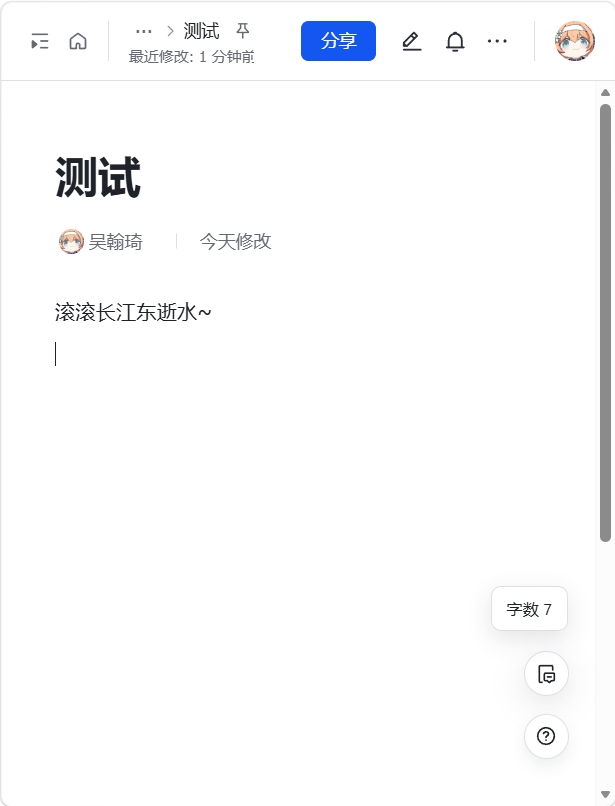
Features
- Displays a live word count in the lower-right corner of any Feishu Doc page.
- Hover to see a breakdown: CJK characters, English words, and numbers.
- The counter widget is draggable — its position is saved to localStorage.
- Double-click to reset the counter to its default position.
- Smart editor detection — automatically excludes titles, sidebars, comment areas, and toolbar text.
Counting Rules
- Each CJK character → 1 word
- Consecutive English letters → 1 word
- Consecutive digits → 1 number item
- Punctuation and whitespace are excluded
Installation
Two options:
- Greasy Fork (recommended): feishu-docs-live-word-counter
- GitHub Raw: Create a new script in Tampermonkey, paste the contents of feishu-word-counter.user.js, and save.
After installation, open or refresh any Feishu Doc page to see the counter.
Supported Pages
feishu.cn/docx/*feishu.cn/docs/*feishu.cn/wiki/*larksuite.com/docx/*larksuite.com/docs/*larksuite.com/wiki/*
Open Source
GitHub: mr-wuliu/feishu-word-counter
MIT License. Issues and PRs welcome.
Login to Comment
You need to log in to leave a comment.
Login