1. The Einstein Problem: An Infinite Puzzle from a Single Shape
Imagine a deceptively simple question: Can you find a single shape that tiles the entire plane without ever producing a repeating pattern?
"Einstein" in German means "one stone," which is exactly what we need here: a single tile (ein Stein), one shape, one answer.
The Einstein Problem: Find a single shape of tile that can tile the entire plane only in an aperiodic manner — meaning no matter how you lay it down, the resulting pattern never repeats itself through translation.
To be precise, we need to distinguish between two types of tiling:
Periodic Tiling
There exists a minimal translation vector such that shifting the entire pattern along it produces an exact overlap. Think of the regular repetition of square floor tiles or a honeycomb.
Aperiodic Tiling
No translation vector exists that can make the pattern coincide with itself. The pattern covers the entire plane, yet no two regions are ever exactly identical.
The history of this problem traces back to the 1960s. In 1961, mathematician Hao Wang proposed the "Wang tiles" conjecture; in 1966, Robert Berger found the first set of aperiodic tiles (requiring 20,426 distinct shapes). Over the next half century, mathematicians steadily reduced the number of required shapes — from thousands to dozens, to the famous Penrose tiling, which needs only 2.
But the ultimate question remained open: Is one shape enough?
It wasn't until March 2023 that retired mathematician David Smith and his collaborators provided the answer: Yes. One is enough. The shape they discovered was named "Hat" because it resembles a top hat. A few months later, they found another true "vampire einstein" — Spectre (ghost) — which achieves aperiodic tiling without even needing to be flipped.
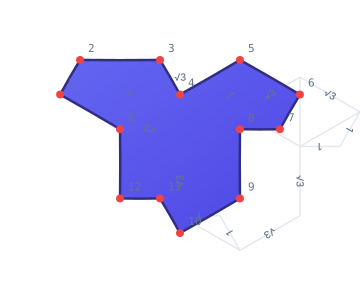
The Hat tile: an aperiodic tile defined by 13 vertices, plotted on a hexagonal grid
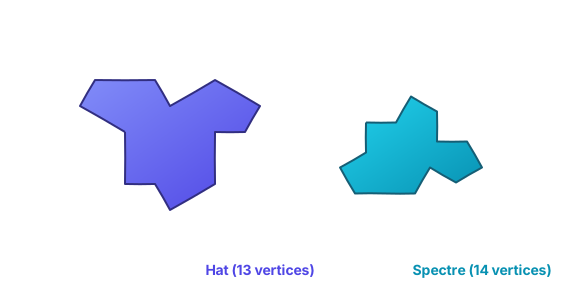
Comparison of the Hat (13 vertices) and Spectre (14 vertices)
2. Spectre Puzzle: Turning Math into a Game
When I first saw the Hat tile, what came to mind wasn't a math paper but a question: Could I turn it into a jigsaw puzzle?
And so Spectre Puzzle was born — a purely static web app with zero runtime dependencies and a hand-written geometry engine in TypeScript.
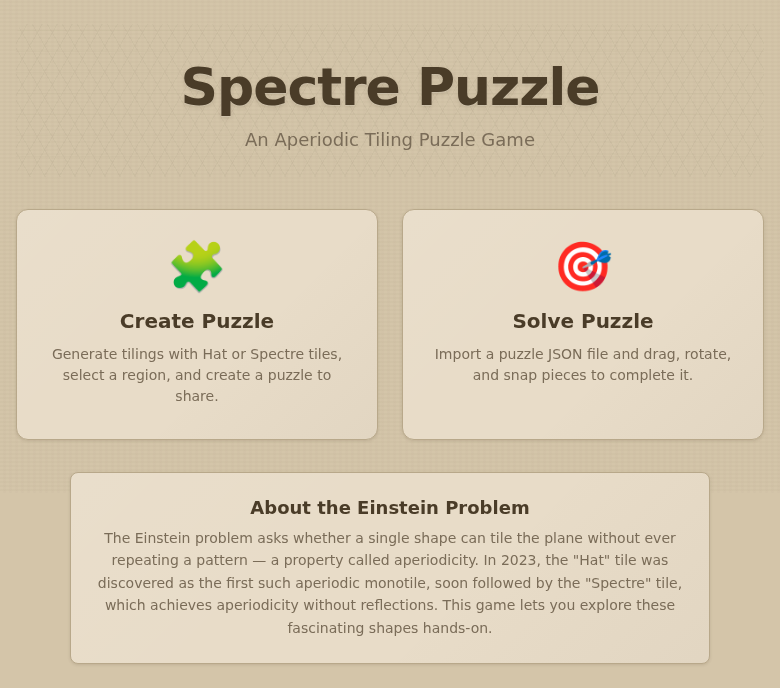
Spectre Puzzle homepage: two entry points — Create Puzzle and Solve Challenge
Game Flow Overview
The game has two steps: first create a puzzle, then solve it. On the creation page, you can generate a tessellation pattern using Hat or Spectre tiles, select a region of interest, and export it as a puzzle. Then on the solve page, import the puzzle file and drag, rotate, and snap the scrambled tiles back into place. Version 0.2.0 also added preset puzzles so you can jump straight into solving.
Creating a Puzzle
Open the creation page. The control panel is on the left, the canvas on the right.
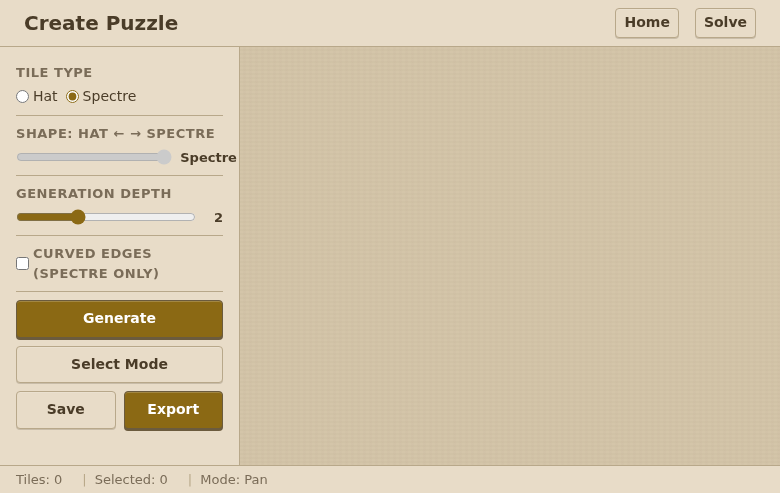
Creation page: control panel on the left, blank canvas on the right waiting to be generated
Choose a Tile Type
At the top of the sidebar, choose your tile type: Hat or Spectre. Spectre is the default. The Hat tile has 13 vertices and requires flipping to achieve aperiodic tiling; Spectre has 14 vertices and needs no flipping.
Adjust Generation Parameters
Three key parameters control puzzle generation:
Shape slider (only available in Hat mode): Continuously interpolates between the Hat and Spectre shapes. All the way left is Hat, all the way right is Spectre, and the middle gives transitional forms between the two.
Generation Depth: The recursion depth of the substitution system. Depth 1 generates a small number of tiles (good for beginners); depth 4 generates over a thousand tiles (extremely challenging). Starting at 2 is recommended.
Curved Edges (Spectre only): When enabled, tile edges become Bézier curves that interlock like a real jigsaw puzzle. You can also click "Edit Curve" to customize the curve shape.
Generate and Select
Click the Generate button, and the canvas renders the full tessellation pattern.
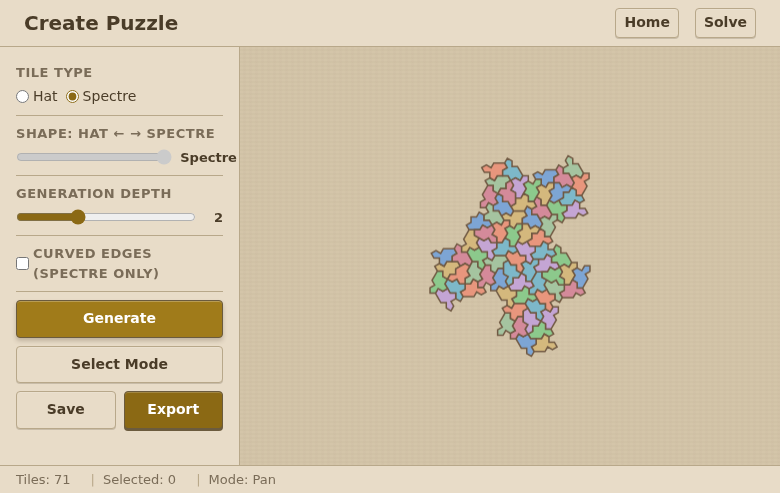
The creation page after generating a Spectre tessellation, showing the complete aperiodic tiling
Then switch to Select Mode and drag a rectangle on the canvas. The system cuts the tiles within the selected region into puzzle pieces. When you're happy with the selection, click Export to save as a JSON file, or click Save to store it in the browser's local storage.
Solving Challenges
Open the solve page. There are three ways to load a puzzle:
Preset puzzles: The "Preset Puzzles" dropdown in the right sidebar offers 8 built-in puzzles, covering both Hat and Spectre tiles across three difficulty levels: easy (3–6 pieces), medium (14–22 pieces), and hard (28–42 pieces). Selecting one loads it immediately.
Import file: Click the Import button and select a .json file exported from the creation page.
Local saves: Click a previously saved puzzle under "Saved Puzzles."
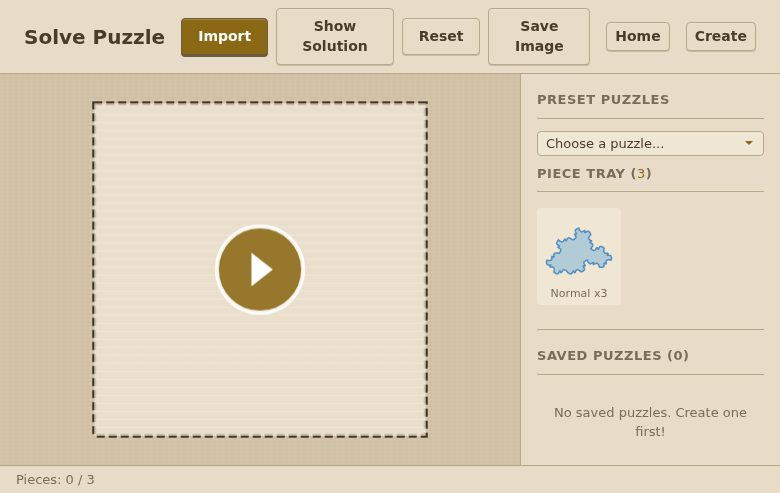
Solve page: a preset puzzle has been loaded, the canvas shows the target outline, and the pieces to place are on the right
Controls
After loading a puzzle, click the Start button in the center of the canvas to begin the timer. All tiles get scrambled into the Piece Tray on the right.
Place a tile: Drag a tile from the Piece Tray on the right onto the canvas.
Move a tile: Click and drag an already-placed tile on the canvas.
Rotate a tile: Select a tile, then drag the rotation handle above it. You can also right-click or Shift+left-click for quick rotation.
Multi-select tiles: Click and drag on an empty area to draw a marquee selection box. All tiles inside get selected together and can be moved and rotated as a group.
Snap alignment: When a tile is close to its correct position, it automatically snaps into place. Successfully snapped tiles change color and lock down, indicating they're in position.
Pan the canvas: Middle-click and drag, or switch to Pan mode and left-click drag. Scroll to zoom.
Helper Features
Show Solution: Reveals the complete solution, returning all tiles to their correct positions.
Reset: Re-scrambles all tiles.
Save Image: Saves the current canvas as a PNG image.
v0.2.0 New Feature: Preset Puzzles
The latest version adds preset puzzles. The dropdown menu in the solve page sidebar includes 8 carefully designed puzzles covering both tile types and three difficulty levels:
Difficulty | Hat | Spectre |
|---|---|---|
Easy (3–6 pieces) | – | 2 puzzles |
Medium (14–22 pieces) | 1 puzzle | 2 puzzles |
Hard (28–42 pieces) | 2 puzzles | 1 puzzle |
Technical Highlights
Zero dependencies: A hand-written geometry engine in pure TypeScript, from polygon clipping to affine transformations to snap logic, with no third-party libraries.
Edge computing: Deployed on Cloudflare Pages with global CDN acceleration. Static assets are served from the nearest edge node, with load times under 100ms.
Curved edges: Bézier curves combined with Catmull-Rom interpolation produce S-shaped interlocking edges, making puzzle pieces fit together like a real jigsaw.
Dual tile system: Supports generation algorithms for both Hat (4-metatile substitution) and Spectre (9-metatile substitution) aperiodic tiles.
3. The Beauty of Math: Visualizing Tile Geometry
Let's dig into the geometric structure of the Hat and Spectre tiles and see how such complex aperiodic patterns emerge from simple mathematical formulas.
3.1 Hexagonal Grid Coordinate System
The 13 vertices of the Hat tile are defined on a hexagonal grid. The mapping from integer coordinates to Cartesian coordinates is:
This means each step on the hex grid corresponds to a horizontal distance of , while maps to , which is exactly the projection of a 60° angle on the unit circle. This is the mathematical essence of equilateral triangle tiling.
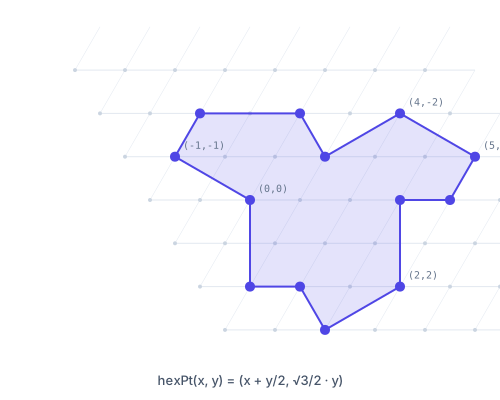
Hexagonal grid coordinate system: the blue highlights mark the 13 vertex positions of the Hat tile
The 13 vertices of the Hat tile expressed in hex coordinates are:
3.2 Edge Length Analysis
Since the Hat is defined on a hexagonal grid, the distance between adjacent vertices can only take two values:
The Spectre tile, on the other hand, uses a offset system, giving it a more uniform edge length distribution. Here is a comparison of the two tiles' edge length distributions:
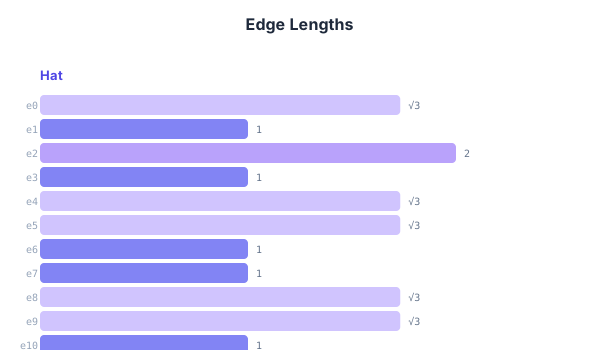
Edge length distribution: Hat edges alternate between {1, √3}, while Spectre is more uniform
3.3 Interior Angle Analysis
For a simple polygon, the sum of interior angles follows:
For the Hat (), the interior angle sum is . For the Spectre (), it is . Below are pie charts showing the interior angle distribution at each vertex:
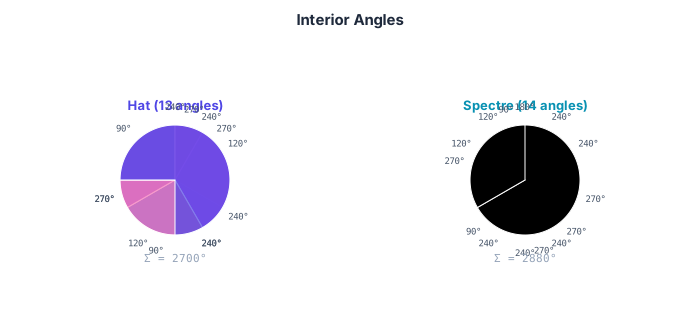
Interior angle distribution pie charts: Hat (Σ=1980°) and Spectre (Σ=2160°)
3.4 Substitution System: From One Tile to Infinity
The core of aperiodic tiling lies in substitution rules. The Hat tile uses 4 metatiles:
H (hexagon): 4 Hats T (triangle): 1 Hat P (parallelogram): 2 Hats F (pentagon): 2 Hats
The substitution process combines the 4 metatiles into a 29-subtile patch, then extracts larger H, T, P, F from the patch. Each round of substitution grows the tile count by roughly times and the edge length by roughly times:
where is the tile count after rounds of substitution and is the characteristic length of the corresponding patch. Spectre uses a more complex 9-metatile substitution system (Gamma, Delta, Theta, Lambda, Xi, Pi, Sigma, Phi, Psi), producing 8 sub-blocks per round.
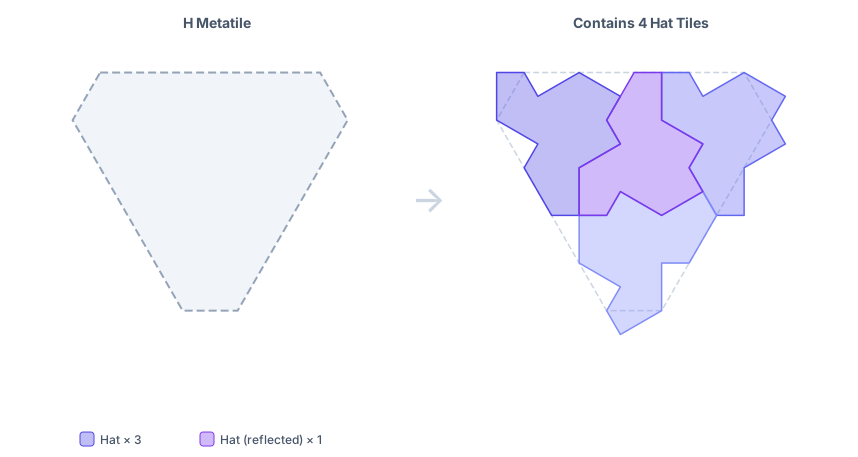
H metatile substitution: 4 Hat tiles (3 original + 1 mirrored) inside the dashed outline
3.5 Curved Edges: Bézier Interlocking
To make the puzzle pieces look like a real jigsaw rather than plain polygons, I added Bézier curves to each edge. The key parameter is the curve offset :
The control points for each edge alternate their offset direction along the perpendicular, forming an S-shaped curve. Adjacent tiles offset in opposite directions, ensuring they interlock like puzzle pieces. Specifically, the control points for the -th edge are:
where is the unit normal vector of the -th edge.
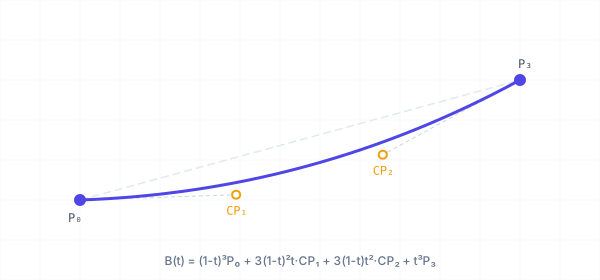
Bézier curve for a single edge: P0→CP1→CP2→P3, with control points offset perpendicularly to form an S shape
Taking it further, Catmull-Rom spline interpolation produces even smoother curves. Given an ordered sequence of points , the Bézier control points between any two adjacent points are:
Boundary points generate virtual points through mirror reflection: , . This ensures smooth continuity at the endpoints.
3.6 Affine Transformations
In a puzzle game, every tile needs to support operations like rotation, translation, and scaling. These can all be expressed uniformly using an affine transformation matrix:
For a 60° rotation (the fundamental operation of hexagonal symmetry):
In Spectre Puzzle, the positioning of every tile is achieved through composition of affine transformation chains. Each substitution step passes the parent metatile's transformation down to its sub-blocks, so the final transformation at a leaf node is the composition of the entire chain:
Conclusion
From David Smith's mathematical discovery in 2023, to a jigsaw puzzle you can play in your browser, to every precisely calculated mathematical visualization in this article — the beauty of math lies in how infinite complexity arises from simple rules.
The Hat tile needs only 13 vertices and a straightforward substitution rule to create patterns that never repeat. Spectre is even purer — it doesn't even need to be flipped. This unity of simplicity and depth is what makes math so compelling.
Come play:
Open source: github.com/mr-wuliu/spectre-puzzle
Login to Comment
You need to log in to leave a comment.
Login